
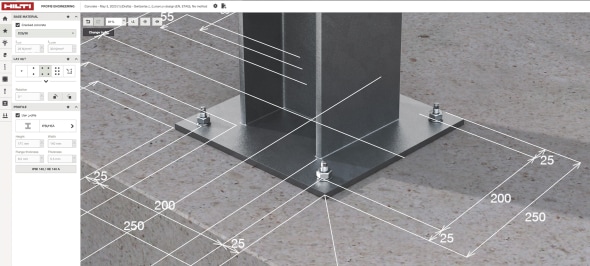
Intuitive dimension editing for simple or complex connections
Based on customer feedback, adjusting dimensions sometimes led to unexpected changes in geometry elsewhere, and we understand this has been frustrating. With the PROFIS Engineering update in November 2025, you get more control and clarity when editing your connection geometry in the Anchoring to Concrete module.
Dimension Visibility
No more clutter. Use the Dimensions button at the top of the 3D view to choose exactly which dimensions you want to see.
Symmetric vs. Asymmetric Geometry
Symmetric Mode
- Save time when your profile, base plate, and anchors are symmetric about the X axis, the Y axis, or both. Each axis is handled independently; X and Y do not need to match. When you adjust one anchor spacing, the other dimensions on that same axis update automatically to maintain symmetry, without affecting the other axis.
Asymmetric Mode
- Need full flexibility? Switch to asymmetric and edit each dimension independently.
Independent Plate and Anchor Dimensions
Changing anchor spacing no longer changes plate size, and vice versa. Dimension strings for plate size and anchor spacing are now placed on opposite sides of the connection.
Concrete Edge Definitions
Choose how you define edge distances with either of these options:
- Anchor center to slab edge
- Profile centerline to slab edge
2D View for Editing Coordinates
Switch to 2D View to adjust geometry using coordinates.
This update helps you be more productive whether you’re designing a symmetric anchor connection or customizing every dimension. 
